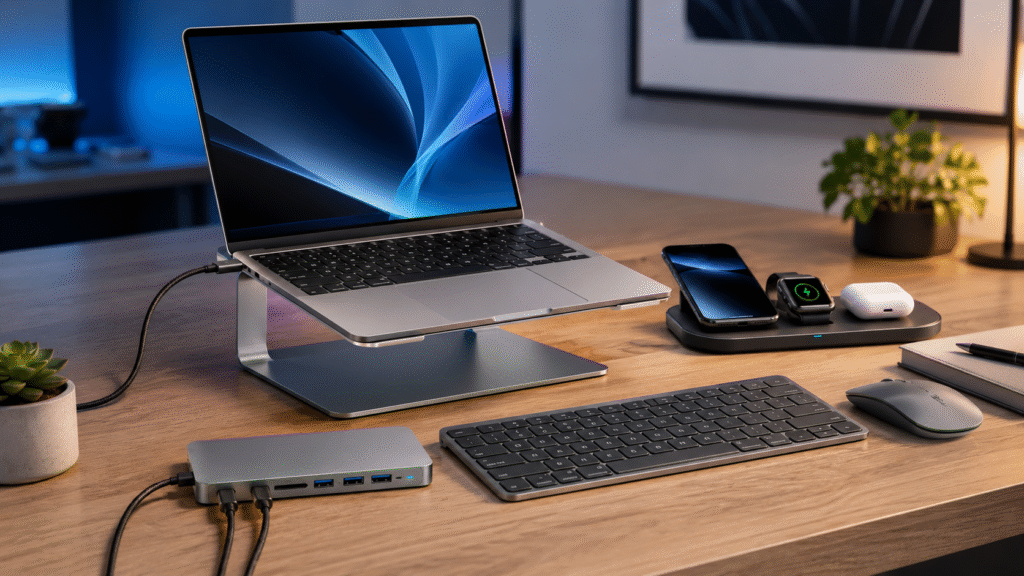
A productive workspace is not defined by the number of gadgets on your desk. The best setup is the one that removes friction—fewer cables, easier connections, accessible storage and reliable charging throughout the day.
Satechi builds premium technology accessories for people who want more functionality without sacrificing clean design. Its collection includes USB-C hubs, docking stations, wireless chargers, keyboards, mice, cables and storage accessories for compatible Mac, iPhone, iPad and Windows devices.
With selected products currently listed in the Satechi sale collection, this is a useful time to decide which upgrade would make the biggest difference to your setup.
Start With the Problem You Want to Solve
Before buying another accessory, identify the task that causes the most frustration. Do you constantly switch charging cables? Are your laptop’s ports always occupied? Is your monitor sitting too low? Do you need more storage for photos or video projects?
Choosing by use case is more effective than choosing by specifications alone. The following Satechi accessories address different needs, helping you spend money on features you will actually use.
For an Organized Charging Station: Trio Wireless Charger
Listed sale price at time of writing: $83.99 — previously $119.99
The Trio Wireless Charger With Magnetic Pad is designed for users who charge several personal devices every day. It provides dedicated charging areas for a compatible smartphone, Apple Watch and wireless-charging AirPods case.
Keeping these devices on one surface reduces cable clutter and makes it easier to see whether everything is ready before leaving home. It works particularly well on a bedside table, office desk or entryway charging shelf.
- Choose it if: You regularly charge a phone, watch and earbuds together.
- Skip it if: You only need to charge one device or require the fastest available wired charging.
For Better Desk Ergonomics: USB-C Monitor Stand Hub XL
Listed sale price at time of writing: $69.99 — previously $149.99
A monitor riser can improve viewing height, while a hub can bring important connections closer to you. The USB-C Monitor Stand Hub XL combines both ideas in one streamlined accessory.
It can help reduce desk clutter and eliminate the need to reach behind a computer for frequently used connections. The raised platform also creates additional space underneath for a keyboard, notebook or other small desk items.
- Choose it if: You want a cleaner desktop and more accessible ports.
- Skip it if: You use a height-adjustable monitor arm and already own a capable dock.
For a 24-Inch iMac: USB-C Slim Dock
Listed sale price at time of writing: $104.99 — previously $149.99
The USB-C Slim Dock for 24-Inch iMac is a specialized accessory for users who want convenient front-facing connectivity while preserving the computer’s minimal appearance.
Photographers, designers and content creators may appreciate easier access to storage and media connections. However, because this dock is designed around a particular computer format, shoppers should confirm the exact iMac model and all required ports before ordering.
- Choose it if: You own a compatible 24-inch iMac and frequently connect removable storage.
- Skip it if: You need a universal dock that can move between several computers.
For a Laptop-Based Workstation: USB-C Multiport MX Adapter
Listed sale price at time of writing: $125.99 — previously $179.99
The USB-C Multiport MX Adapter suits users who expect one compact computer to support a more complete workstation. A multiport adapter can connect displays, peripherals, storage and power through a simplified laptop connection.
This kind of setup is valuable for hybrid workers. At a desk, the laptop becomes a productivity station; when it is time to leave, one main connection can be removed instead of disconnecting every accessory individually.
- Choose it if: Your workflow relies on multiple ports and external equipment.
- Skip it if: You only need one additional USB port or a basic display output.
For Mobile Presentations: USB-C Multimedia Adapter M1
Listed sale price at time of writing: $104.99 — previously $149.99
The USB-C Multimedia Adapter M1 provides a portable way to add common connections to a compatible Mac setup. It can be useful for meetings, presentations, classrooms and temporary workspaces where available ports are unpredictable.
The most important step is checking compatibility. Display behavior can vary by computer model, operating system and adapter design, so compare the adapter’s specifications with your exact Mac before purchase.
- Choose it if: You want several useful connections in a travel-friendly format.
- Skip it if: You need a permanent high-end desktop dock with extensive monitor support.
For Travel and Backup: USB-C Cables
Selected USB-C data and charging cables also appear in Satechi’s sale collection. A spare cable may not be the most exciting upgrade, but it is often one of the most practical. Keeping one in a laptop bag and another at your desk reduces the chance of being left without a compatible connection.
When comparing cables, do not look only at the connector. Check supported charging wattage, data-transfer capability, length and intended use. Some USB-C cables focus on power, while others support higher data speeds or additional features.
How to Choose the Right Satechi Accessory
- Write down your exact device model. Similar-looking computers can have different compatibility requirements.
- Count the ports you need today. Include displays, storage, keyboard, mouse, Ethernet and charging.
- Plan for your normal workflow. A travel adapter and a permanent desk dock solve different problems.
- Check display specifications. Confirm resolution, refresh rate and the number of supported monitors.
- Review charging requirements. Make sure the accessory and power adapter provide suitable wattage.
- Confirm what is included. A cable, charger or SSD may need to be purchased separately.
Can iPhone and iPad Users Save More?
Satechi currently advertises 30% off selected products in its iPhone and iPad collection with code DEVICE30. Browse the eligible collection and confirm that the code applies in the cart before ordering.
Final Thoughts
The best Satechi accessory is not necessarily the product with the most ports. It is the product that removes a repeated inconvenience from your day. A wireless charging station may deliver the biggest improvement for an Apple-device household, while a multiport adapter or specialized dock may be more valuable for a professional workstation.
Start with compatibility, match the features to your actual workflow and compare the current price with the value of the problem being solved. That approach helps you build a smarter setup without collecting accessories you rarely use.
Disclosure: Prices and promotions were checked on August 5, 2026, and may change without notice. Verify current pricing, availability, compatibility, shipping terms and discount eligibility on Satechi’s website. This post may contain affiliate links, which means we may earn a commission at no additional cost to you.