In today’s digital work environment, teams need a smart system to manage tasks, deadlines, and communication. monday.com is a modern work management platform designed to simplify project tracking and improve collaboration. It combines visual dashboards, automation tools, and flexible workflows to help teams stay organized and productive.
Whether you run a small business or manage large projects, monday.com offers tools that make daily work easier and more structured.
What Is monday.com?
monday.com is a cloud-based platform that helps teams plan, track, and manage work in one place. Instead of using multiple tools for tasks, communication, and reporting, teams can handle everything inside one dashboard.
The platform uses boards to organize projects. Each board contains tasks, timelines, status updates, and assigned team members. Users can customize these boards based on their workflow needs, making the system flexible for different industries.
The clean and colorful interface also makes it easy for beginners to start using the platform without technical knowledge.
Key Features of monday.com Platform

monday.com offers several powerful features that improve productivity and teamwork:
- Visual Project Tracking: Manage tasks using timeline, Kanban, and calendar views.
- Automation: Reduce repetitive work by automating updates and reminders.
- Custom Dashboards: Track performance and progress in real time.
- Team Collaboration: Share updates, comment on tasks, and upload files.
- Integration Options: Connect workflows with commonly used business tools.
These features help teams stay focused while reducing manual effort.
monday.com vs Other Project Management Tools
Many businesses compare project management platforms before making a decision. Below is a simple comparison of monday.com with other popular tools:
| Feature | monday.com | Trello | Asana |
|---|---|---|---|
| Ease of Use | Very Easy | Easy | Moderate |
| Automation | Advanced | Basic | Advanced |
| Customization | High | Limited | High |
| Visual Dashboards | Strong | Basic | Strong |
| Best For | All team sizes | Small teams | Medium to large teams |
This comparison shows that monday.com provides a strong balance between simplicity and advanced functionality.
Benefits of Using monday.com for Teams
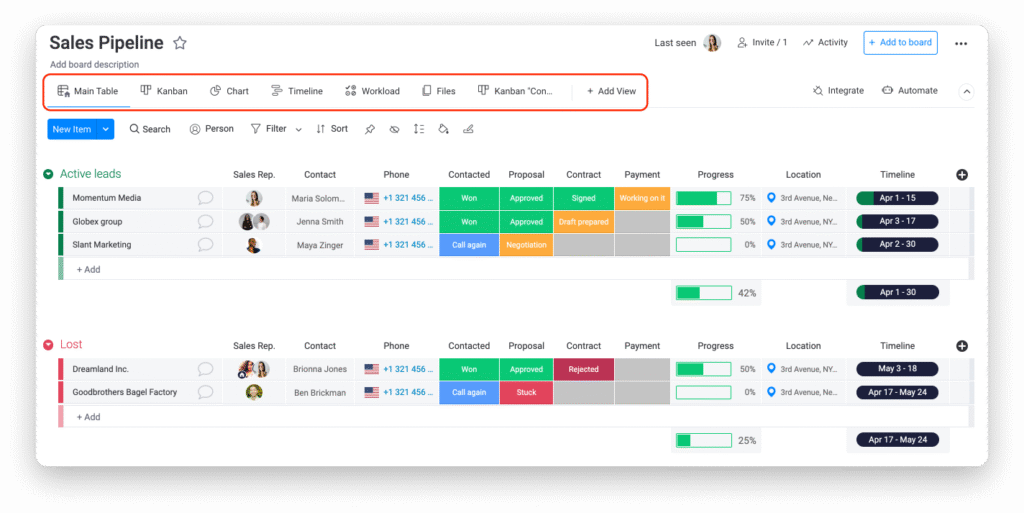
One of the biggest benefits of using monday.com platform tools is improved clarity. Team members can easily see their tasks, deadlines, and progress updates. This reduces confusion and keeps everyone aligned.
Automation also saves time by handling routine actions such as status changes and notifications. In addition, real-time collaboration helps remote teams stay connected without depending on multiple communication tools.
If you are exploring ways to improve workflow structure, you can also read our guide on project planning strategies and team productivity improvement.
Final Thoughts
monday.com is a flexible and easy-to-use work management platform that fits different types of teams and industries. Its visual layout, automation features, and collaboration tools make project management simpler and more efficient.
For teams looking to organize tasks, improve communication, and track progress effectively, monday.com offers a practical solution that grows with business needs.